
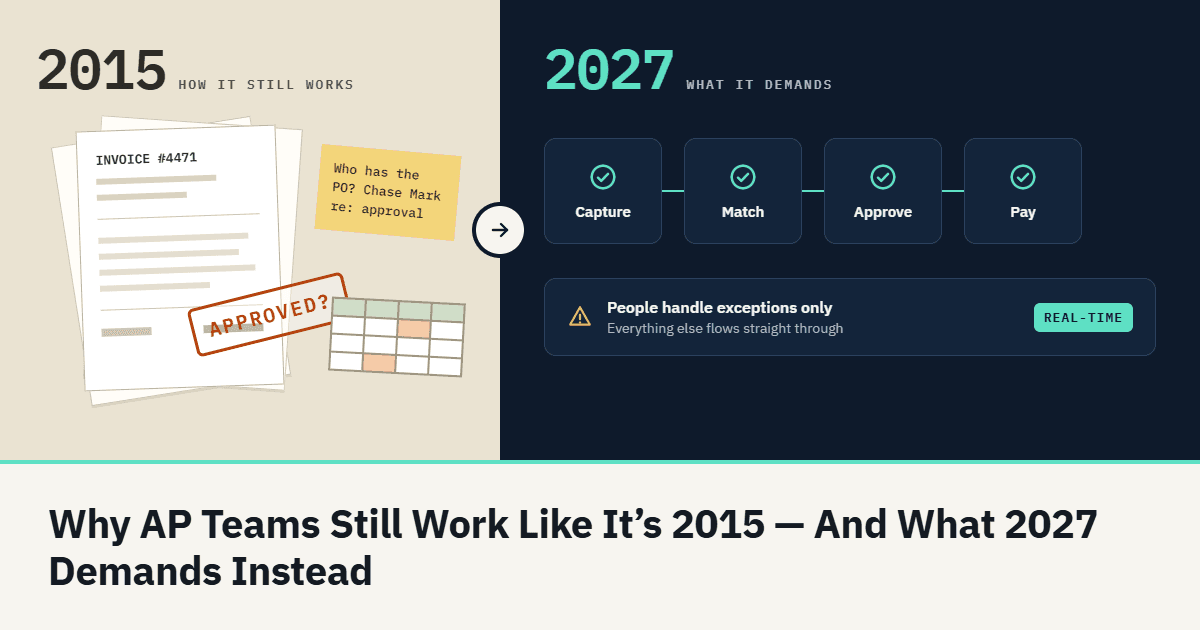
Why AP Teams Still Work Like It's 2015 And What 2027 Demands Instead
By the PRMAI Team
Pick any AP team and ask one question: "Walk me through what happens when an invoice arrives."
One version of the answer sounds like this: someone opens a shared inbox, downloads a PDF, types the details into the enterprise resource planning (ERP) system, emails the buyer to confirm the purchase order (PO), waits, chases, and finally sends it to a manager for approval. Then the same person updates a spreadsheet so everyone knows where things stand.
That process was normal in 2015.
How do you know if your invoice process still runs like 2015?
Each situation below is a step where an invoice waits for a person to move it.
1. The shared inbox is your system of record
If an invoice's status can only be found by searching an inbox, a missed email, a wrong forward or a newer message on top can hold up payment.
2. Humans re-type what a machine can read
Manual keying is slow, and it is also where errors enter. A wrong digit in an amount or a wrong PO number becomes a mismatch that someone has to untangle days later.
3. Every invoice gets the same level of attention
In a 2015 process, a clean invoice that matches its PO perfectly gets the same handling as a messy one with missing data. Your best people spend their time on invoices that match instead of the ones with a price mismatch or a missing goods receipt note (GRN).
4. Exceptions are handled by chasing
When a 3-way match fails, the AP clerk emails the buyer, who emails the vendor and waits for a reply. Nobody owns the exception, and the invoice ages quietly.
5. Approvals depend on who is online
Approval by email forward means an invoice waits whenever one approver is travelling, on leave or busy. Late payments follow, and so do calls from vendors.
Worked example: a partial delivery billed at a new price
The 3-way match fails on both quantity and price, and the invoice is ₹15,000 above what is owed.
Example amounts: a Intake for 500 units of a packaging item is approved. A request for quotation (RFQ) goes out, and the vendor’s quote comes back at ₹200 a unit. The PO is issued for 500 units at ₹200, ₹1 lakh in total. The vendor ships 450 units, and the GRN records 450. The invoice then arrives for 500 units at ₹210, ₹1.05 lakh in total.
The match fails twice. On quantity, 500 are invoiced against 450 received. On price, ₹210 is billed against ₹200 ordered. What the company owes is 450 units at ₹200, or ₹90,000, so the invoice is ₹15,000 too high: 50 extra units at ₹210 is ₹10,500, and 450 units at ₹10 extra is ₹4,500. In the inbox process, this lands on the AP clerk, who emails the buyer.
Why do AP teams still work like it’s 2015?
Three things can keep the manual process in place: its costs are spread across several line items, a changeover puts vendor payment runs at risk, and an invoice can touch four teams.
Late fees, missed early-payment discounts and month-end overtime sit under different headings, so no single report shows what the process costs.
AP releases vendor payments, so a failed changeover could show up as a missed payment run.
An invoice can touch AP for entry, procurement for the PO, finance for approval and IT for the ERP link, so changing the process can need all four teams to agree.
How accounts payable process looks in PRMAI .
In modern day scenario , an invoice should reach a person only when it fails a check. PRMAI is a sourceto-pay (S2P) platform that runs sourcing, purchase orders, goods receipt and invoice matching as one flow, so each invoice is checked against the purchase order, vendor and approval that came before it (see procurement orchestration). The invoice steps run like this:
- Invoices are picked up from your mailbox abd a workflow gets triggered in PRMAI with a unique ID associated to it.
- The sender is matched against your vendor master, which flags unknown senders early.
- AI reads each invoice and extracts its fields, with a confidence score on each field.
- Extracted data is checked against your validation rules before it moves on.
- Each invoice goes to a 3-way match, AP review or an exception queue.
- AI resolves routine 3-way match exceptions, and the rest go to the buyer or category manager.
- Invoices that pass the match go to approvers through your approval workflow.
- Approved invoices are posted to the right general ledger (GL) account in your ERP by category, without re-typing.
How do you start moving out of 2015?
Measure the baseline, find the top exception reasons, give each one an owner, then automate capture and reading.
- Measure the baseline. Track how long an invoice takes from arrival to approval, and what share needs manual correction.
- Find your top exception reasons. Group a month of held invoices by cause, such as a price mismatch, a quantity mismatch or a missing GRN, and fix the largest group first.
- Give exceptions an owner. Name the buyer or category manager who resolves each cause.
- Automate capture and reading. It takes out the manual keying where errors enter.
- Review monthly. Look at which fields AI reading got wrong and tighten the rules.
FAQs
Do we have to replace our ERP to do this?
PRMAI works alongside your ERP. It actually complements ERP strengths and seamlessly integrates with ERPs and demonstrates and fetches in goods . The Integration helps pulling the open PRs from the ERP, publish RFQs, negotiate with Vendors and finlaize the vendors and pushes the finalized vendor info into ERP for creation of POs in ERP.
Will AI replace the AP team?
No. It removes repetitive typing and chasing. People still make the judgment calls on exceptions, vendor relationships and controls.
What if our invoices come in many different formats?
AI reads each invoice and extracts its fields, so a new vendor layout does not need a new template.
What if the AI reads an amount wrong and we pay it?
For invoices raised against a PO, the invoice is still matched against the PO and the goods receipt, so an amount that disagrees with either fails the match and goes to a person before payment.
Invoices stall at a mismatch with no owner, so name an owner for each exception type and let software take the invoices that match.
To see how PRMAI reads an invoice and matches it against its PO and GRN, book a demo